


How To Integrate Paypal Payment Gateway with Laravel

Today, we will learn how to implement the Paypal payment gateway with Laravel. all payment integration is very useful for e-commerce websites. we will use in this tutorial how to implement the PayPal payment gateway in the Laravel 8 application. we can easy to implement PayPal payment integration in Laravel 8.
PayPal is an American company operating a worldwide online payment system. Paypal payment gateway is a more popular web development. Most clients prefer to use the PayPal payment gateway for money transfers.
We use srmklive package for Laravel PayPal integrates with Laravel 8.
Create a new project
We are creating a scratch Laravel project, Now create a new project using the below command.
composer create-project --prefer-dist laravel/laravel paypal_demoInstall srmklive packages
Now we install srmklive/paypal the package for PayPal integration, So run the bellow command.
composer require srmklive/paypal:~1.0Now configure srmklive packages in the config/app.php file and register the required PayPal service in providers and aliases arrays.
#config/app.php

'providers' => [
    ...
    Srmklive\PayPal\Providers\PayPalServiceProvider::class,
]

'aliases' => [
    ...
	'PayPal' => Srmklive\PayPal\Facades\PayPal::class,
]
php artisan vendor:publish --provider "Srmklive\PayPal\Providers\PayPalServiceProvider"Open the config/paypal.php file and change.
#config/paypal.php
<?php

return [
    'mode'    => 'sandbox', // Can only be 'sandbox' Or 'live'. If empty or invalid, 'live' will be used.
    'sandbox' => [
        'username'    => env('PAYPAL_SANDBOX_API_USERNAME', ''),
        'password'    => env('PAYPAL_SANDBOX_API_PASSWORD', ''),
        'secret'      => env('PAYPAL_SANDBOX_API_SECRET', ''),
        'certificate' => env('PAYPAL_SANDBOX_API_CERTIFICATE', ''),
        'app_id'      => 'APP-80W284485P519543T', // Used for testing Adaptive Payments API in sandbox mode
    ],
    'live' => [
        'username'    => env('PAYPAL_LIVE_API_USERNAME', ''),
        'password'    => env('PAYPAL_LIVE_API_PASSWORD', ''),
        'secret'      => env('PAYPAL_LIVE_API_SECRET', ''),
        'certificate' => env('PAYPAL_LIVE_API_CERTIFICATE', ''),
        'app_id'      => '', // Used for Adaptive Payments API
    ],

    'payment_action' => 'Sale', // Can only be 'Sale', 'Authorization' or 'Order'
    'currency'       => 'USD',
    'notify_url'     => '', // Change this accordingly for your application.
    'locale'         => '', // force gateway language  i.e. it_IT, es_ES, en_US ... (for express checkout only)
    'validate_ssl'   => true, // Validate SSL when creating api client.
];
Create a controller
We need to create a new controller. now run the below command and create a new controller.
php artisan make:controller PaypalControllermake:controller command to create a new file inside the app/Http/Controllers/ folder.
#app/Http/Controllers/PaypalController.php

<?php

namespace App\Http\Controllers;

use Illuminate\Http\Request;
use Srmklive\PayPal\Services\ExpressCheckout;

class PaypalController extends Controller
{
    public function __construct(){
        $this->provider = new ExpressCheckout();
    }

    public function payment() {
        $data = [];
        $data['items'] = [
            [
                'name' => 'devnote tutorial create',
                'price' => 160,
                'desc' => 'Description for devnote tutorial!',
                'qty' => 1
            ]
        ];

        $data['invoice_id'] = 1;
        $data['invoice_description'] = "Your order #{$data['invoice_id']} Invoice";
        $data['return_url'] = route('payment.success');
        $data['cancel_url'] = route('payment.cancel');
        $data['total'] = 160;

        $provider = $this->provider;
        $response = $provider->setExpressCheckout($data);
        $response = $provider->setExpressCheckout($data, true);
        return redirect($response['paypal_link']);
    }
    public function success(Request $request) {
        $provider = $this->provider;
        $response = $provider->getExpressCheckoutDetails($request->token);
        if (in_array(strtoupper($response['ACK']), ['SUCCESS', 'SUCCESSWITHWARNING'])) {
            return view('success');
        }
        dd('Something is wrong.');
    }
    public function cancel() {
        return view('cancel');
    }
}
Create a routes
We need to add a resource route for the PayPal payment gateway. Now open the routes/web.php file.
#routes/web.php
Route::get('/', function () {
    return view('index');
});

Route::get('payment', 'PaypalController@payment')->name('payment');
Route::get('payment/success', 'PaypalController@success')->name('payment.success');
Route::get('cancel', 'PaypalController@cancel')->name('payment.cancel');
Create a blade file
We create the index.blade.php file inside the resources/views/ folder.
resources/views/products/index.blade.php
<!doctype html>
<html>
<head>
    <meta charset="utf-8">
    meta name="viewport" content="width=device-width, initial-scale=1">
    <title>How To Integrate Paypal Payment Gateway with Laravel - devnote.in</title>
    <link rel="stylesheet" href="https://stackpath.bootstrapcdn.com/bootstrap/3.4.1/css/bootstrap.min.css">
</head>
<body>
    <div class="text-center">
       <div class="content">
            <h1>How To Integrate Paypal Payment Gateway with Laravel - devnote.in</h1>
            <a href="{{ route('payment') }}" class="btn btn-success">Pay $160 from Paypal</a>
       </div>
    </div>
</body>
</html>
resources/views/products/success.blade.php
<!doctype html>
<html>
<head>
    <meta charset="utf-8">
    <meta name="viewport" content="width=device-width, initial-scale=1">
    <title>How To Integrate Paypal Payment Gateway with Laravel - devnote.in</title>

    <link rel="stylesheet" href="https://stackpath.bootstrapcdn.com/bootstrap/3.4.1/css/bootstrap.min.css">
</head>

<body>
    <div class="container">
        <div class="row text-center">
            <div class="col-sm-6 col-sm-offset-3">
                <br><br>
                <h2 style="color:#0fad00">Success</h2>
                <h3>Dear, Devnote</h3>
                <p style="font-size:20px;color:#5C5C5C;">Thank you for visiting us and making your first purchase!</p>
                <br><br>
                <a href="{{ url('/') }}" class="btn btn-success">Return home</a>
            </div>
        </div>
    </div>
</body>
</html>
resources/views/cancel.blade.php
<!doctype html>
<html>
<head>
    <meta charset="utf-8">
    <meta name="viewport" content="width=device-width, initial-scale=1">
    <title>How To Integrate Paypal Payment Gateway with Laravel - devnote.in</title>

    <link rel="stylesheet" href="https://stackpath.bootstrapcdn.com/bootstrap/3.4.1/css/bootstrap.min.css">
</head>

<body>
    <div class="container">
        <div class="row text-center">
            <div class="col-sm-6 col-sm-offset-3">
                <br><br>
                <h2 style="color:#0fad00">Fail</h2>
                <h3>Dear, Devnote</h3>
                <p style="font-size:20px;color:#5C5C5C;">Opps, this delivery faild. something wrong!</p>
                <br><br>
                <a href="{{ url('/') }}" class="btn btn-success">Return home</a>
            </div>
        </div>
    </div>
</body>
</html>
Configuration PayPal
Now configure the PayPal username, secret and certificate key in the .env file.
#.env

PAYPAL_CURRENCY=INR
PAYPAL_SANDBOX_API_USERNAME=username
PAYPAL_SANDBOX_API_PASSWORD=password
PAYPAL_SANDBOX_API_SECRET=signature
PAYPAL_SANDBOX_API_CERTIFICATE=
Get PayPal account detail
Now open PayPal developer API. Now login.
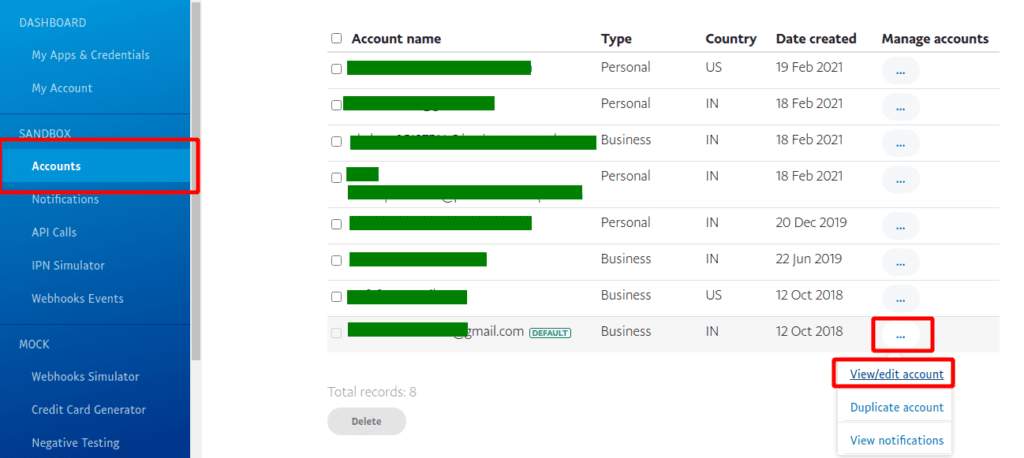
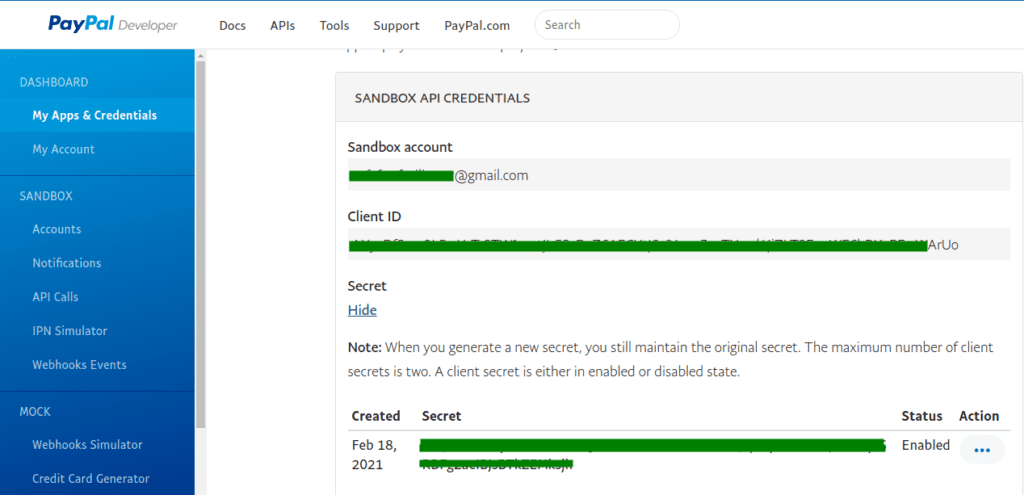
Now ready to integrate PayPal, You can run the below command:
php artisan serveOpen the below URL on the browser:
http://localhost:8000



[…] I’m working on project where i need to integrate PayPal for Payments. I’ve Integrated PayPal in Laravel 8 by help of this link https://devnote.in/how-to-integrate-paypal-payment-gateway-with-laravel/ […]
Class “Srmklive\PayPal\Services\ExpressCheckout” not found
hellow am getting this type of error in laravel 8