


How to remove sorting from a specific column in dataTables

In this post, we will read How to remove sorting from a specific column in dataTables. Datatables by default, sorting has added to all columns, pagination, and searching provide. Simple remove from a column where it is not necessary but columnDefs option while initializing Datatables.
Contents
- Database table structure
- HTML Code
- jQuery Code
- PHP Code
- Output
- Conclusion
Database table structure
First, create student table.
CREATE TABLE `student` (
    `id` int(11) NOT NULL PRIMARY KEY AUTO_INCREMENT,
    `first_name` varchar(80) NOT NULL,
    `last_name` varchar(80) NOT NULL,
    `email` varchar(80) NOT NULL,
    `gender` varchar(10) NOT NULL,
    `city` varchar(80) NOT NULL
) ENGINE=InnoDB DEFAULT CHARSET=utf8;
HTML Code
Create a <table> where add id=’studTable’ and class='display datatable'. and dataTables default provide specify header columns in <thead> tag.
#index.php
<!doctype html>
<html>
    <head>
        <title>How to remove sorting from specific column in dataTables - devnote.in</title>
        <link href='https://cdn.datatables.net/1.10.19/css/jquery.dataTables.min.css' rel="stylesheet">
        <script src="https://ajax.googleapis.com/ajax/libs/jquery/3.3.1/jquery.min.js"></script>
        <script src="https://cdn.datatables.net/1.10.19/js/jquery.dataTables.min.js"></script>
    </head>
<body>
    <div>
    <h1 style="text-align: center">How to remove sorting from specific column in dataTables</h1>
        <table id='studTable' class='display dataTable'>
            <thead>
                <tr>
                    <th>First name</th>
                    <th>Last name</th>
                    <th>Email</th>
                    <th>Gender</th>
                    <th>City</th>
                </tr>
            </thead>
        </table>
    </div>
</body>
</html>
jQuery Code
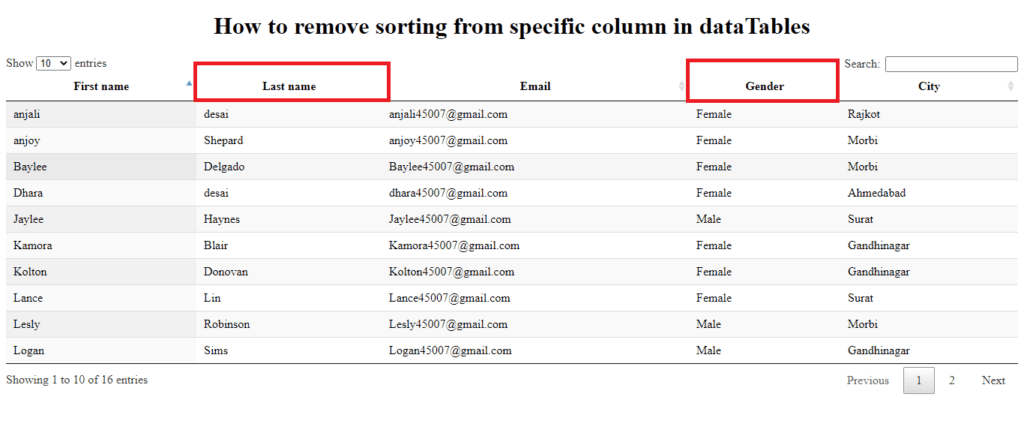
Databases initialize on $(‘#studTable’) selector and set serverMethod to post and ajax url to ajax.php. Remove sorting column use columnDefs option to remove sorting from a column. Pass column index in targets within [](array braket) and set orderable to false. we will remove , I removed sorting column from last name and gender column.
$(document).ready(function(){
    // Datatables initialize
    $('#studTable').DataTable({
        'processing': true,
        'serverSide': true,
        'serverMethod': 'post',
        'ajax': {
            'url':'ajax.php'
        },
        'columns': [
            { data: 'first_name' }, // index - 0
            { data: 'last_name' }, // index - 1
            { data: 'email' }, // index - 2
            { data: 'gender' }, // index - 3
            { data: 'city' } // index - 4
        ],
        'columnDefs': [ {
            'targets': [1,3],
            'orderable': false, // orderable false
        }]
    });
});
PHP Code
Now, create a new ajax.php file. and read DataTable POST values and assign them in variables. Then count the total number of records from student table. Now fetch records from student table.Initialize $response array with required parameters and it will return JSON format.
<?php
#ajax.php

$conn = mysqli_connect("localhost", "root", "","devnote");

// Check connection
if (!$conn) {
    die("Connection failed: " . mysqli_connect_error());
}

// Read value
$row = $_POST['start'];
$draw = $_POST['draw'];
$row_per_page = $_POST['length'];
$column_index = $_POST['order'][0]['column'];
$column_name = $_POST['columns'][$column_index]['data'];
$column_sort_order = $_POST['order'][0]['dir']; // asc or desc
$search_val = $_POST['search']['value']; // Search value

// Search
$search_query = " ";
if($search_val != ''){
    $search_query = " and (first_name like '%".$search_val."%' or last_name like '%".$search_val."%' or email like '%".$search_val."%' or gender like'%".$search_val."%' or city like'%".$search_val."%' ) ";
}

// Total number of records without filter
$sql = mysqli_query($conn,"select count(*) as counts from student");
$records = mysqli_fetch_assoc($sql);
$total_records = $records['counts'];

// Total number of records with filter
$sql = mysqli_query($conn,"select count(*) as counts from student WHERE 1 ".$search_query);
$records = mysqli_fetch_assoc($sql);
$with_filter_total_record = $records['counts'];

// Fetch records
$stud_query = "select * from student WHERE 1 ".$search_query." order by ".$column_name." ".$column_sort_order." limit ".$row.",".$row_per_page;

$stud_records = mysqli_query($conn, $stud_query);

$data = array();
while ($row = mysqli_fetch_assoc($stud_records)) {
    $data[] = array(
        "first_name"=>$row['first_name'],
        "last_name"=>$row['last_name'],
        "email"=>$row['email'],
        "gender"=>$row['gender'],
        "city"=>$row['city']
    );
}

// Response data
$response = array(
    "draw" => intval($draw),
    "iTotalRecords" => $total_records,
    "iTotalDisplayRecords" => $with_filter_total_record,
    "aaData" => $data
);

echo json_encode($response);
Output
Conclusion
The indexing starts from 0. Add columnDefs option while Databases initializing where set orderable to false.




DataTables warning: table id=all_invoices – Requested unknown parameter ‘5’ for row 13, column 5. For more information about this error, please see http://datatables.net/tn/4
how to solve it